How to carry your project context across ChatGPT, Claude, Gemini & Perplexity (without re-pasting it every time)
Last updated: July 25, 2026
If you use more than one AI model, you know the ritual. ChatGPT for one job, Claude for another, Gemini or Perplexity when they fit better — and every time you switch, you start a blank chat and re-explain the same things. Who you are. What the project is. The stack, the constraints, how you want answers formatted. The model was never the problem; the blank page was.
This page covers why that happens and the real ways to fix it — including the honest, no-tools way — so one project brief can follow you across all four platforms.
Why every chat starts from zero
Each platform has grown its own answer to "remember things about me": custom instructions, memory, project workspaces. They're genuinely useful — and every one of them stops at the platform's own walls.
| Platform | Native way to persist context | Where it stops |
|---|---|---|
| ChatGPT | Custom instructions, memory, Projects | Your OpenAI account. Nothing carries to Claude, Gemini or Perplexity. |
| Claude | Projects with project instructions | Your Anthropic account. |
| Gemini | Gems, saved info | Your Google account. |
| Perplexity | Spaces with instructions | Your Perplexity account. |
Native features as publicly documented, July 2026. They change often — the boundary doesn't: none of them crosses to another vendor.
That boundary is the whole problem. If your workflow lives inside one model, the native features are enough — use them. If your workflow spans two or more, your context is now maintained in two or more places, and those copies drift apart the week you stop paying attention.
The workarounds, honestly rated
1. A context file you paste by hand
The simplest fix is also a genuinely good one: keep a context.md in your notes app and paste it at the top of every new chat, whatever the platform. It works everywhere, costs nothing, and you always know exactly what the model was told. Something like:
# Project: Atlas — internal analytics dashboard

## Goal
Ship v2 of the reporting module by September.

## Stack & constraints
- React 18 + TypeScript, Tailwind; backend is FastAPI + Postgres
- No new dependencies without a strong reason
- All code examples in TypeScript

## How to answer
- Be concise; code first, explanation after
- Flag any breaking change explicitly
The limits are friction, not principle: you have to remember to do it, find the right note among several projects, and keep it updated. Most people who start this ritual keep it up for exactly as long as the project is exciting.
2. Custom instructions on each platform
Setting per-platform instructions removes the paste step — but now the same brief is maintained four times, once per vendor, and the copies drift. And account-level instructions are global: they follow you into every chat, including the ones where your project brief is noise.
3. Projects, Gems and Spaces
The strongest native option. ChatGPT Projects, Claude Projects, Gemini Gems and Perplexity Spaces all scope instructions to a workspace, which is exactly the right shape. If you live in one model, this is the answer. Across models, it's the drift problem again with better ergonomics: four parallel workspaces to keep in sync by hand.
The clean way: one context per folder, any model
What the workarounds are all reaching for is a single source of truth that lives outside the platforms and gets into a chat with no ritual. That's the shape of the fix, whoever builds it. Foldery, a Chrome extension that organizes AI chats into folders across the four platforms, is built around it:
- One context per folder. Any folder can hold standing instructions, written in markdown — your project brief, kept in exactly one place. It's stored locally in your browser.
- One click into any model. From the folder, "New chat with context" opens a fresh chat on ChatGPT, Claude, Gemini or Perplexity with the context already loaded. Nothing is sent on its own — you type your first prompt and hit send.
- Subfolders inherit. A subfolder can Merge its context with its parents' (the default), Replace them, or opt out with None. A "Client X" folder carries the client brief; the "Client X / Billing" subfolder adds billing specifics on top.
The delivery mechanism is worth being precise about, because the platforms differ: on ChatGPT and Claude, the context is attached to the new chat as a small markdown file; on Gemini and Perplexity, it's pasted into the composer instead. Either way the model gets the same text, and you see exactly what it received.
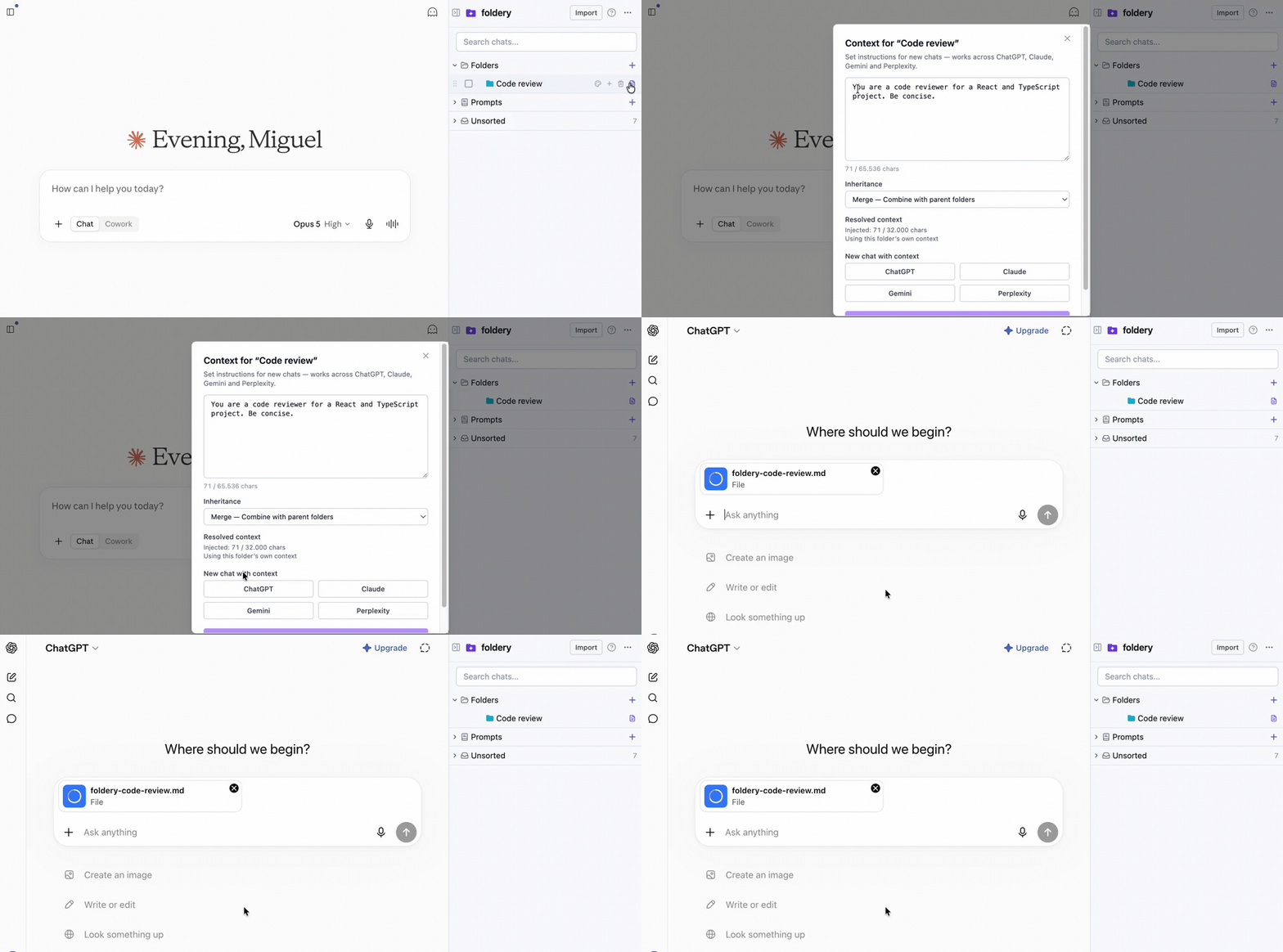
Foldery stores a reusable context in markdown per folder and loads it into a new chat on ChatGPT, Claude, Gemini or Perplexity in one click — as an attached file on ChatGPT and Claude, pasted into the composer on Gemini and Perplexity. The feature is free.
Setting it up, step by step
- Install Foldery from the Chrome Web Store. Free, no account.
- Create a folder for the project in the sidebar — it appears on all four platforms.
- Open "Folder context" from the folder row and write (or paste) your brief. The template above drops in as-is.
- Pick inheritance if you use subfolders: Merge, Replace or None. Merge is the default and usually what you want.
- Click "New chat with context" and choose the platform. The chat opens with the context loaded; ask your question and send.
From then on, updating the brief in the folder updates what every future chat starts with — on all four platforms at once.
The honest limits
- You start the chat from the folder. Foldery doesn't watch chats you open on the platforms directly and inject into them — the context travels when you launch the chat from Foldery.
- Size caps. A folder stores up to 65,536 characters of context; the resolved context injected into a chat (own + inherited) is capped at 32,000 characters and truncated beyond that, keeping the most specific folder's text.
- Four platforms, not five. ChatGPT, Claude, Gemini and Perplexity. No Grok — if that matters to you, see how Foldery compares to Sortbase, which supports it.
- Context is free; syncing it isn't. Folder context works fully on the free tier (up to 10 folders). Carrying your folders and contexts to another device uses Pro's end-to-end encrypted sync.
For everything else Foldery does — folders, prompts, full-text search, import — see the guide.
Frequently asked questions
Can I share the same context between ChatGPT and Claude?
Yes. Keep the context in one place instead of inside either platform. Manually, that's a context.md note you paste into each new chat. With a browser extension like Foldery, you store one context per folder and start a new ChatGPT or Claude chat from that folder with the context already attached as a markdown file.
Does this work with Perplexity?
Yes. Foldery supports ChatGPT, Claude, Gemini and Perplexity. On ChatGPT and Claude the context is attached to the new chat as a small markdown file; on Gemini and Perplexity it's pasted into the message box instead, since those composers don't take file attachments the same way. Grok is not supported.
Is my context private?
With Foldery, the context is stored locally in your browser — there's no account, and no chat content is sent to Foldery's servers. If you enable cross-device sync (a Pro feature), the context is end-to-end encrypted on your device with a passphrase only you hold before anything is uploaded.
Do I still have to copy and paste?
No. You write the context once, in the folder. One click on "New chat with context" opens a fresh chat on the platform you pick with the context already loaded. Nothing is sent on its own — you still type your first prompt and press send yourself, with the context in place.
Is folder context free?
Yes. Folder context, all four platforms, the prompt library and full-text search are part of Foldery's free tier, which allows up to 10 folders — no card, no account. Pro adds unlimited folders and end-to-end encrypted sync, which is what carries your contexts to other devices.
How much context can a folder hold?
Each folder stores up to 65,536 characters of context. When a chat starts, the resolved context — the folder's own text plus anything inherited from parent folders — is capped at 32,000 characters. Beyond that it's truncated, keeping the most specific folder's text and noting the cut.
Stop re-explaining your project
One context per folder, loaded into ChatGPT, Claude, Gemini or Perplexity in a click. Free — no card, no account.
Add to Chrome — it's freeor read how Foldery works first